❦
00 · TITLE
AI for Mortals
Cloning

Building my own note‑taking app

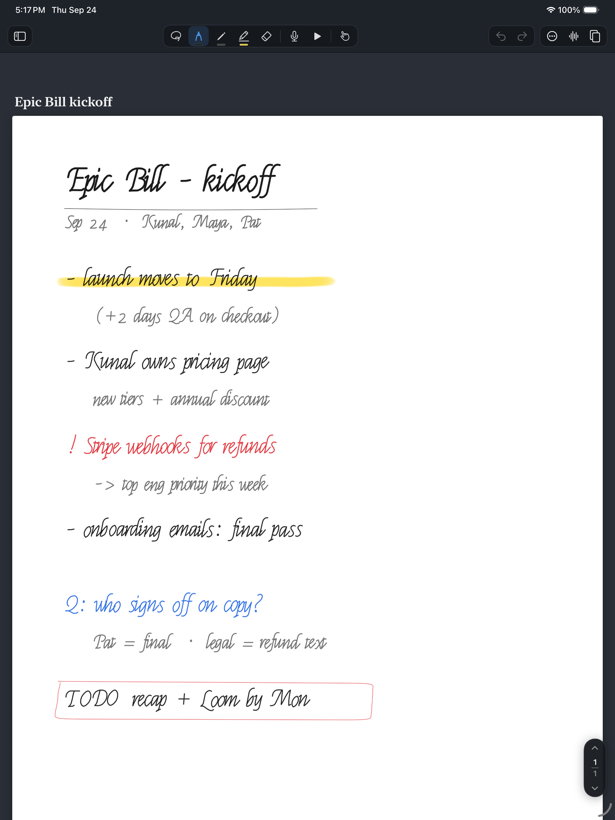
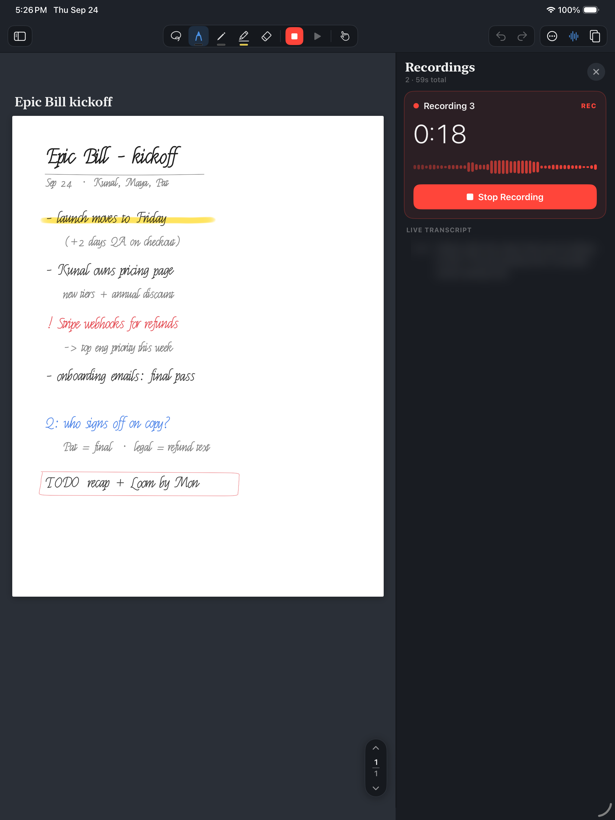
It records while you write, and on playback it shows you exactly where your pen was when each word was said.

Built with
Claude Opus 5.5
Stack
SwiftUI, PencilKit
Phases
Five
❦
01 · THE BUILD
AI for Mortals
How it got built

Five phases, one prompt each

Phase 0
Research
and spec
An agent uses the real app, then writes the PRD.
Phase 1
App
screens
Every screen mocked up. React before building.
Phase 2
Build it
properly
Native iPadOS, QA’d, running on the device.
Phase 3
Agent
handoff
One button sends the note to a coding agent.
Phase 4
Production
ready
Storage and auth, so anyone can use it.
❦
02 · PHASE ZERO
AI for Mortals
Phase0

Research the app, write the spec

An agent used the real app until it understood the hard part, then wrote the PRD that the build agent would follow.

→PRD.md, twelve sections
→SwiftUI, PencilKit, AVFoundation
→Neon Postgres for cloud backup
The promptClick to read ↗
“I just wanted you to get a sense of how Notability works, so we can build out our own version… the hardest part is the recording feature, and then getting exactly when you’re taking notes on that record.”
❦
03 · PHASE ONE
AI for Mortals
Phase1

Every screen, mocked up first

No code until every screen is drawn and I have marked it up. The recording view is the one I want changed, so that screen gets designed from scratch.

→Library, editor, recording, playback
→Our own recording view
→I react, the design moves from there
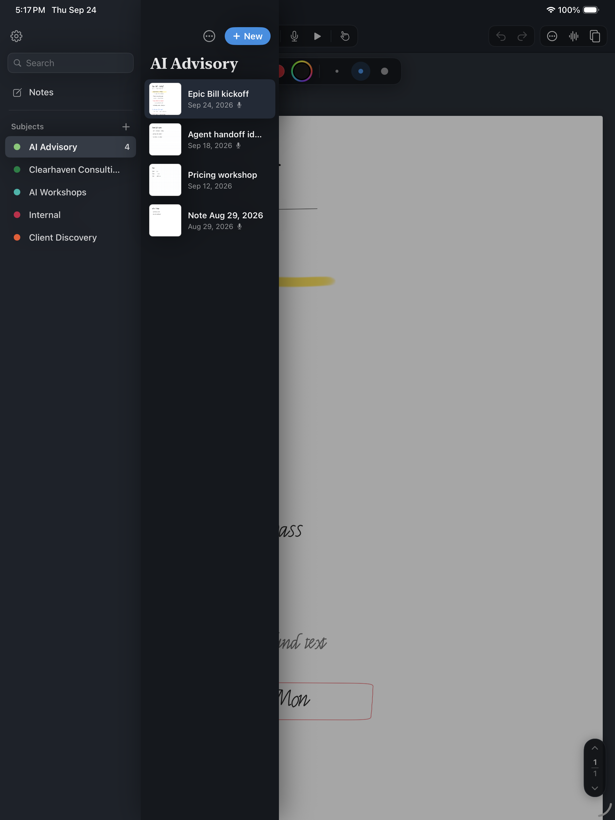
Library
Library
Editor
Editor
The promptClick to read ↗
“I want all of the different app screens, and I’m going to react to those… I don’t like how Notability does it.”
❦
04 · PHASE TWO
AI for Mortals
Phase2

Build the real application

Screens approved, the mockup becomes a native iPadOS app, written and QA’d and installed on the iPad in one run.

→Native iPadOS, not a prototype
→Sub-agents spawned for the build
→Running on the iPad
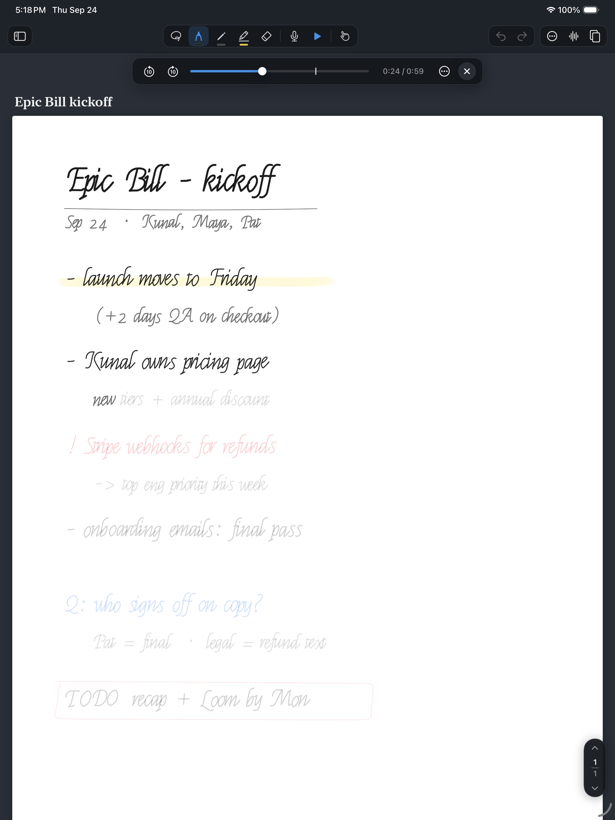
Synced replay
Synced replay
Recording
Recording
The promptClick to read ↗
“Don’t stop until this app is live, or as close to live on my device as possible.”
❦
05 · PHASE THREE
AI for Mortals
Phase3

Hand the note to an agent

One button sends the handwriting, the transcript and the timing to a coding agent, which works out the repo and the tasks on its own.

→Handwriting read as handwriting
→Transcript matched to the pen stroke
→Speaker detection and names
The promptClick to read ↗
“I want the AI agent to see my notes, like in handwriting, and read my handwriting… and then understand what repo to go into. Basically, what tasks to do. It’s probably just like one button.”
❦
06 · ACCOUNTS & DATABASE
AI for Mortals
The promptClick to read ↗
“Add sign‑in and a real database so more than one person can use this…”

One service gives you both

Everything so far lives on one iPad. Accounts and a database are what let other people in.

Neon
Postgres & sign‑in, one place
Neon Auth

People sign in

Neon handles the accounts now, so there is no separate login service to wire up.

Neon Postgres

Notes get an owner

Every note and recording is stamped with who it belongs to, so your iPads stay in sync and nobody sees anyone else's.

Then it is one prompt. The agent builds the schema, moves your existing notes across, and keeps the app working offline.

❦
07 · PHASE FOUR
AI for Mortals
Phase4

Make it production ready

Storage, accounts, and whatever else the app needs before it can be deployed and used by other people.

→Neon Postgres storage
→Authentication
→Production deploy
The promptClick to read ↗
“Set up more database storage, and authentication, and anything else if needed, to get this to a fully functional, production ready application.”
❦
08 · ON YOUR OWN IPAD
AI for Mortals

Installing it on your own iPad

You install it yourself from your Mac. It never goes near the App Store.

1Install Xcode, sign in with your Apple ID
2Give the app a bundle ID nobody else uses
3iPad: Settings › Privacy & Security › Developer Mode
4Plug the iPad in, pick it in Xcode, press Run
5iPad: General › VPN & Device Management › Trust

A free Apple ID stops the app working after 7 days — press Run again to reset it. $99 a year makes it last a year.

The promptClick to read ↗
“Get this app running on my iPad. Set the bundle identifier, turn on automatic signing…”
❦
09 · ON THE APP STORE
AI for Mortals

Putting it on the App Store

Only if you want strangers using it. Everything below is on top of the build.

1Join the Apple Developer Program — $99 a year
2App Store Connect: make the app record, claim the name
3Xcode: Product › Archive, then Distribute
4Write a privacy policy and host it somewhere
5Answer the privacy questions — every service you send audio to
6Screenshots at every size Apple asks for
7Add a delete‑my‑account button if you have accounts
8Submit. Review takes days and can come back no.
The promptClick to read ↗
“Get this app ready to submit to the App Store. Handle the code side…”